Every surface
The five things you can create in a workspace — page, dashboard, canvas, view, and form — and what each is for.
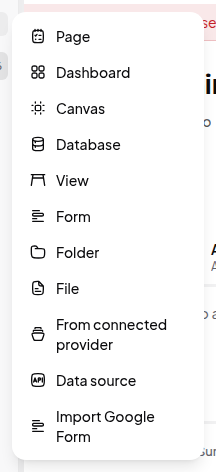
Everything in a workspace is an item in the sidebar. Click + next to Workspace, or New in the top bar, and you can create:
| Surface | What it is | Reach for it when |
|---|---|---|
| Page | A document made of blocks — text, media, embeds, tables, and live data | You’re writing something |
| Database | Records with typed fields and saved views | You’re tracking many of the same thing |
| Dashboard | A grid of widgets over your data | People need to see the state of things at a glance |
| Canvas | An edgeless surface of shapes, text, and connectors | You’re thinking spatially — diagrams, maps, flows |
| View | A standalone saved view of one database | A specific slice deserves its own place in the sidebar |
| Form | A public or internal form that writes records into a database | You need input from other people |
| Folder | Holds other items | You’re organising |
| File | An uploaded asset | You’re storing something |
You can also create from a connected provider, add a data source, or import a Google Form.
Pages vs. dashboards
Both hold blocks, and they share most block types, so the difference is intent rather than capability:
- A page is read top to bottom. It’s prose first, with data embedded in it.
- A dashboard is a grid you arrange in two dimensions, with tabs, parameters, and a theme. It’s data first, with prose as labelling.
If you find yourself carefully positioning things side by side, you want a dashboard. If you’re writing paragraphs, you want a page.
Records have pages too
Every database record has its own page-like body — open a record and you get a full block editor under its properties. That’s where descriptions, requirements and notes belong; the typed fields are for the facts you filter and group by. See Every field type.
Where each is documented
- Blocks in a page — all 39 block types
- Dashboards and Dashboard widgets
- Every view type — the seven database layouts
- Actions and Automations — making things do something
- Canvas basics, Collect data with forms